
// SETUP_GUIDE
How to install and activate JJ OnMedia Photos
Six steps, start to finish. Takes about two minutes.
1
Download the ZIP file
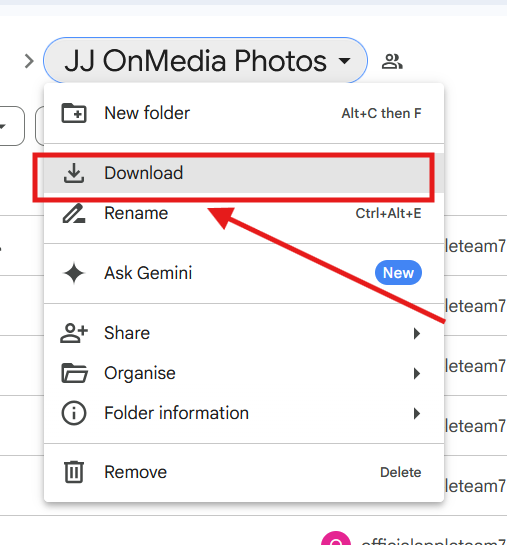
Grab the extension file from the download link on this site. If you're getting it from a shared drive folder, use the Download option from the file menu, as shown below.
2
Go to chrome://extensions/
Open a new tab and type chrome://extensions/ into the address bar.
3
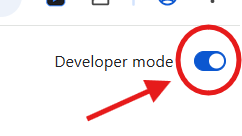
Turn on Developer mode
Find the Developer mode toggle in the top-right corner of the Extensions page and switch it on.
4
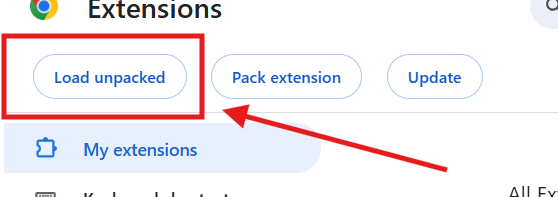
Load the unpacked extension
Click "Load unpacked" and select the extension folder.
Important: unzip the downloaded file first, then select the unzipped folder itself — not the files inside it, and not the ZIP file directly.
5
Open Facebook and activate your license
Go to any Facebook profile or page and click into the Photos section. A popup will appear asking you to activate your license.
Activate your license
Enter your license key to unlock JJ OnMedia Photos.
Don't have a key?
No key? Message us on Telegram.
Message now
6
Refresh and start using it
Refresh the Facebook page, open the extension again, and you're ready to start scanning and downloading.