
Bulk-download your Instagram photos in one pass.
JJ OnMedia IG scans an Instagram page, finds every photo, and lets you download them all as a ZIP — in batches, on your terms.
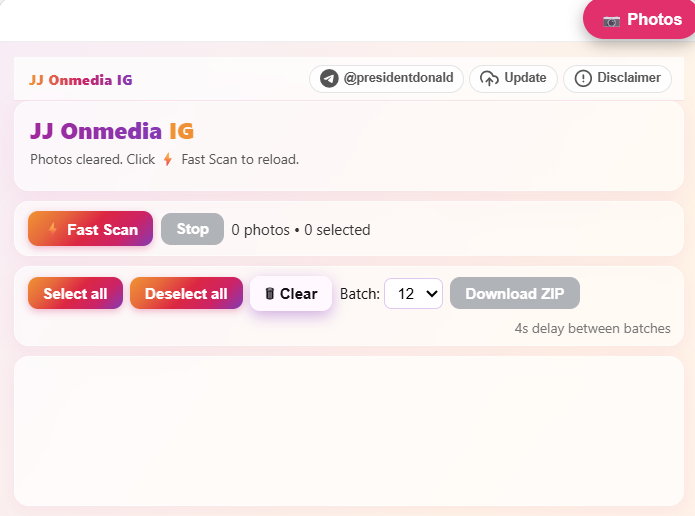
Everything you need to grab your Instagram photos, fast.
No manual saving one image at a time. Scan, select, download.
Fast Scan
Scans the page in one shot and lists every photo it finds.
Select / Deselect / Clear
Fine-tune exactly which photos you want, or clear results and start fresh.
Batch ZIP Downloads
Set your batch size and download in controlled chunks, packaged as a ZIP.
How to Install & Activate
Same install process as JJ OnMedia Photos — if you've already set that one up, steps 1–4 will look familiar.
Download and unzip
Grab the JJ OnMedia IG file below, then unzip it on your computer.
Go to chrome://extensions/
Open a new tab and type chrome://extensions/ into the address bar.
Turn on Developer mode
Find the Developer mode toggle in the top-right corner and switch it on.
Load the unpacked extension
Click "Load unpacked" and select the unzipped folder.
Open Instagram and activate your license
Go to an Instagram profile's Photos section and open the JJ OnMedia IG panel. You'll need a license key to unlock full use.
No key yet? Message us on Telegram. Message nowRefresh and start using it
Refresh the Instagram page, reopen the panel, and click Fast Scan to get started.
Ready to grab your Instagram photos?
Download JJ OnMedia IG and follow the steps above.
Download Now