
Bulk-download your Facebook photos in one pass.
JJ OnMedia Photos scans a page, finds every photo, and lets you download them all as a ZIP — in batches, on your terms.
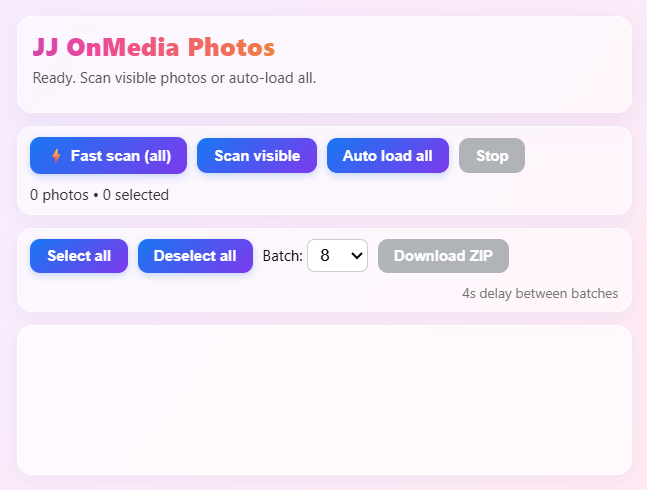
Everything you need to grab your photos, fast.
No manual right-click-saving one image at a time. Scan, select, download.
Fast Scan (All)
Scans the entire page in one shot and lists every photo it finds.
Scan Visible
Only scans what's currently loaded on screen — quick and lightweight.
Auto Load All
Automatically scrolls and loads the full album before scanning.
Select / Deselect
Fine-tune exactly which photos you want before downloading.
Batch Downloads
Set your batch size and download in controlled chunks, not all at once.
ZIP Export
Everything packaged into a single ZIP file, ready to save locally.
How to Activate & Use
Download and install
Grab the extension file below and add it to your browser.
Open the Facebook page you want
Navigate to the album or page containing the photos you want to save.
Open the JJ OnMedia Photos panel
Click the extension icon in your browser toolbar to open the interface.
Scan the page
Choose Fast Scan (all), Scan Visible, or Auto Load All depending on what you need.
Select your photos
Use Select All, Deselect All, or pick individual photos from the results.
Set batch size and download
Choose your batch size and click Download ZIP to save everything locally.
Good to Know
Runs in your browser
Scanning and downloading happen locally — nothing is uploaded to a third-party server.
You control the batches
Adjustable batch size and delay between downloads, so you're never overwhelmed.
Educational tool
Built for personal use and learning — see the disclaimer in the footer before using it.
FAQ
Is JJ OnMedia Photos free?
JJ OnMedia Photos offers a free trial so you can test it out. To keep using it after the trial ends, a purchase is required.
Does it access private albums or photos I don't have permission to view?
No — it only works with photos already visible to you on the page you're viewing in your own browser session.
Does it store or send my photos anywhere?
No — everything is processed locally in your browser and saved directly to your device.
Is this affiliated with Meta or Facebook?
No — JJ OnMedia Photos is an independent, third-party tool and is not affiliated with, endorsed by, or sponsored by Meta Platforms, Inc.
What browsers does it work on?
Check the download page for current browser compatibility details.
Ready to grab your photos?
Download JJ OnMedia Photos and start scanning in under a minute.
Download Now